
We're excited to announce enhancements to how voyage data synchronizes between the Voyage Details and the Claims Manager. Our goal is to make the process more predictable, transparent, and efficient, ensuring your claims always have the most up-to-date operational information.
This update clarifies the "source of truth" for your data and gives you more control over when and how structural changes to a voyage are reflected in your claims. This iteration focuses specifically on cargo and port data.
What's New & How It Works
The core principle of this update is that the Voyage Details are the single source of truth for all data. Changes now flow in one direction only: from Voyage to Claim. This ensures that your claims are always based on the official voyage schedule and cargo manifest.
If you create a claim from the Voyage, you will see a new tag alerting you. For every linked port call, you will also see a link icon to show if that schedule is properly linked.
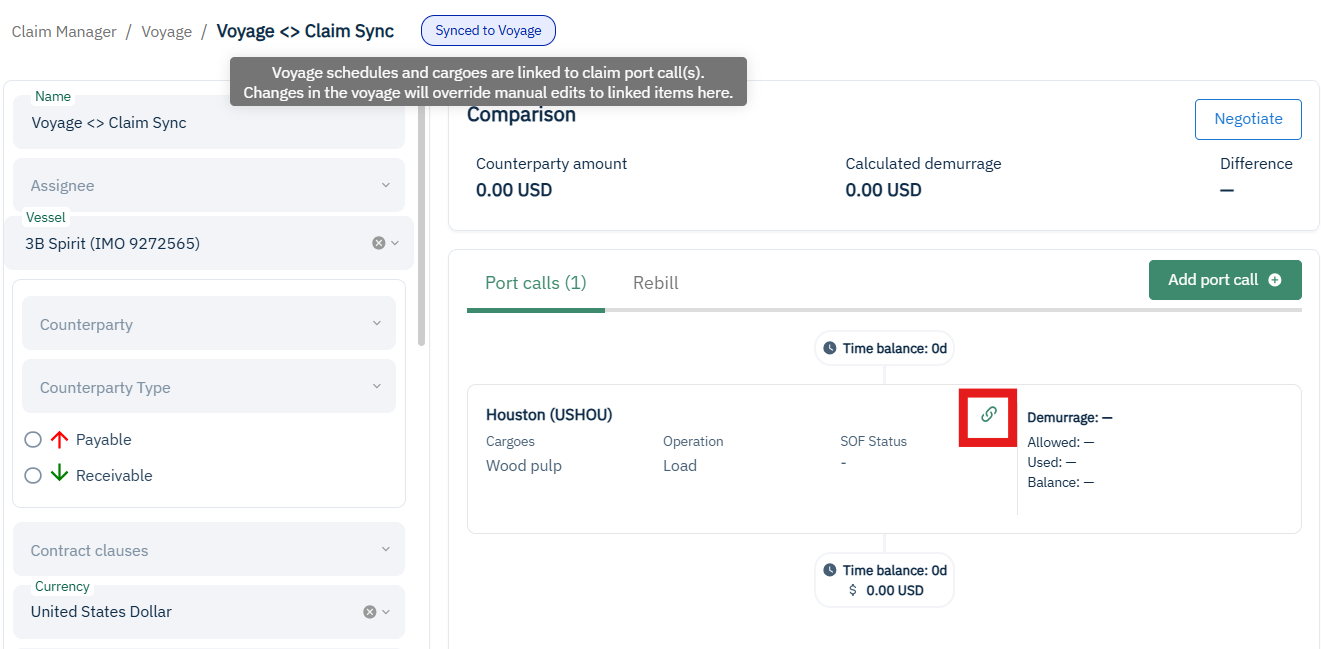
Synchronization happens in two ways: Automatically for day-to-day changes and manually for major structural updates. This gives you the confidence of real-time updates for things like timing, combined with the control to manage significant voyage changes.
If a Voyage and Claim get out of sync, you will see the new "sync" icon on the demurrage tab of the Voyage turn red. Clicking on it will pull up a pop-up that will clearly list the schedule details on the Voyage and on the Claim so you can see the differences. A recommended action will also appear with the option for you to manually synchronize.
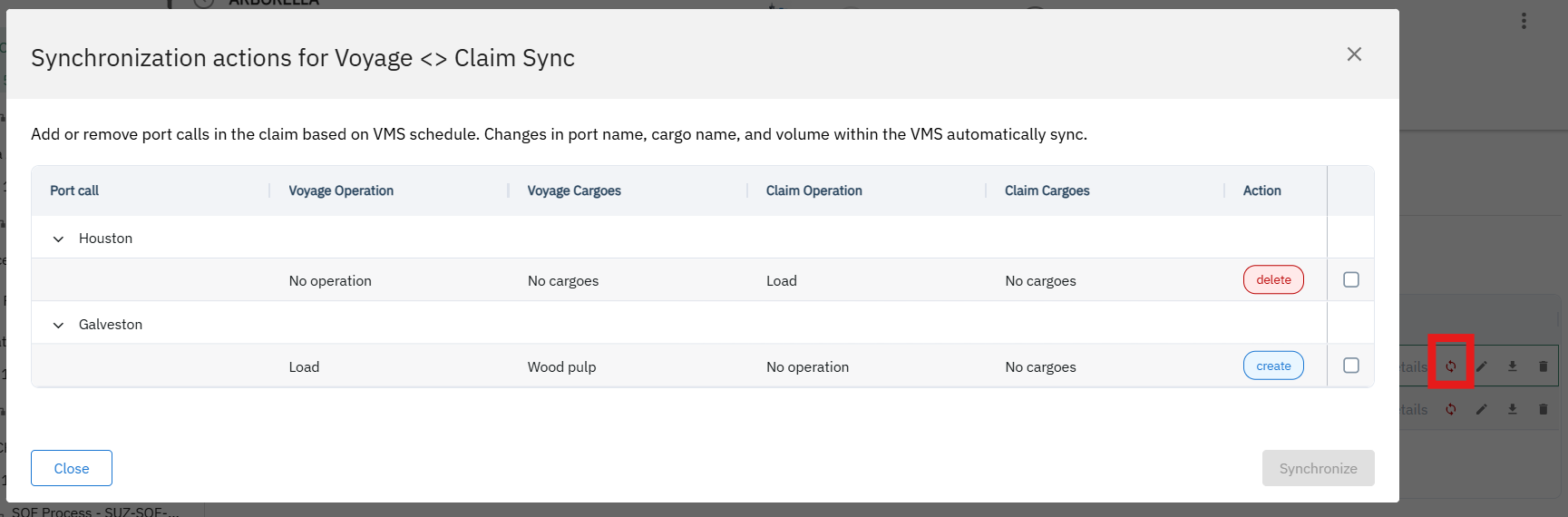
Here’s a breakdown of the new sync logic:
1. Automatic Synchronization: Seamless Daily Updates
Once a claim is linked to a voyage, certain types of updates will flow through automatically. You don't need to do a thing.
What syncs automatically:
Schedule Edits: Changes to a schedule's details, such as the port or terminal name will automatically update all linked port calls within the claim.
Cargo Additions & Edits: When you add new cargo or edit existing cargo details in the Voyage, this information will automatically update the corresponding cargo lines in the claim
2. Manual Synchronization: You're in Control of Structural Changes
For bigger changes that alter the structure of the voyage itself, you now have control. These changes require a manual sync, allowing you to review and confirm the updates before they appear in your claim.
When is a manual sync required?
Adding New Schedules: If a new port is added to the voyage after the claim was created, it will not appear in the claim automatically. You will need to trigger a manual sync and select the new schedule(s) you wish to add to the claim.
Adding a Second Operation to a Schedule: A single port schedule can have both a Load and a Discharge operation.
If a schedule initially only had cargo for one operation (e.g., Load), a single port call is created.
If cargo for the second operation (e.g., Discharge) is added later, the second port call will not be created automatically. You must perform a manual sync to create the new, separate port call for the discharge operation.
Removing a Schedule: This is a deliberate, multi-step process to prevent accidental data loss.
First, all cargo must be removed from the schedule in VMS.
Then, the schedule itself can be removed from the voyage in VMS.
Finally, you must perform a manual sync. During this sync, the now-orphaned port call(s) associated with that removed schedule will be deleted from your claim.
How Port Calls and Cargo are Created
Understanding how port calls are generated is key to using the new system.
At Claim Creation: When you create a claim from a voyage, the claim analyzes the voyage's schedules and cargo.
If a schedule has cargo for both Load and Discharge, two separate port calls are created (one for Load, one for Discharge).
If a schedule has cargo for only one operation, one port call is created.
If a schedule has no cargo, one port call is created, but it will be created without an operation type. This port call will be updated automatically with an operation type (Load or Discharge) as soon as cargo is added to that schedule in the Voyage.
Cargo Lines: Each individual cargo line in the Voyage is represented as a separate, distinct line in the claim. Cargo lines are never merged or summed.
Summary: Key Takeaways for Your Daily Work
| Action in Voyage | Result in Claim |
|---|---|
| Edit port or terminal name | Port call updates automatically |
| Add or edit cargo details | Cargo line updates automatically |
| Add a new port/schedule to the voyage | Nothing happens until you sync |
| Add a second operation (Load/Discharge) to a schedule | Nothing happens until you sync |
| Remove a schedule from the voyage | Port call is not removed until you sync |
These enhancements are designed to give you a more reliable and controlled experience. By clearly separating automatic updates from manual ones, we aim to reduce surprises and ensure your financial claims are always built on a solid, accurate foundation.
For any questions or to learn more, please don't hesitate to contact our support team.