
We introduced two new final statuses for demurrage claims – Withdrawn and No Claim – along with a structured Discrepancy Reason picklist. These additions improve audit trails, reporting accuracy, and operational clarity by distinguishing why a claim was never paid or never submitted.
New Claim Statuses – When to Use Which
| Definition | When to Use |
|---|---|
| Withdrawn - A submitted claim that is voluntarily retracted by the claimant before payment or rejection | – You discover an error after submission – A commercial agreement waives the claim – You realize the claim is invalid (time bar, contract exclusion, etc.) – Duplicate claim was submitted |
| No Claim - No claim was ever submitted because demurrage was never triggered or applicable | – Voyage completed within free time – No delay occurred at port – Contract terms exclude demurrage entirely for this voyage |
Key Distinction
Withdrawn = Claim existed → then removed by claimant
No Claim = Claim never existed → file closed without submission
Note: If you perform a calculation on a receivable claim, find the amount is $0, and therefore do not submit a claim, use No Claim (not Withdrawn).
Discrepancy Reasons – When to Use Each
The Discrepancy Reason field explains why a claim reached a final non-paid status.
| Discrepancy Reason | When to Use |
|---|---|
| Contract Terms | The charter party excludes demurrage for this scenario |
| Trader/Charterer Concession | A commercial agreement resulted in waiving a submitted claim |
| Demurrage Concession | Operational compromise (e.g., splitting disputed hours) reduced claim to zero after submission |
| Limited Liability | A contractual cap on demurrage liability made the claim partially or fully uncollectible |
| Calculation Error | – Withdrawn: You submitted with an error, then withdrew to correct it – No Claim: Your calculation showed $0 (e.g., free time absorbed all delay) |
| Missed Laycan or Window | The vessel did not arrive within the agreed laycan, making demurrage inapplicable |
| Time Bar | You discovered after submission that the claim was filed after the contractual deadline |
User Flow – How You Will Be Prompted
When you change a claim’s status to Withdrawn or No Claim, the system will enforce data completeness as follows:
Step 1: Select New Status
Navigate to the claim record → Change Claim Status dropdown → Select Withdrawn or No Claim.
Step 2: Check for Discrepancy Reason
If
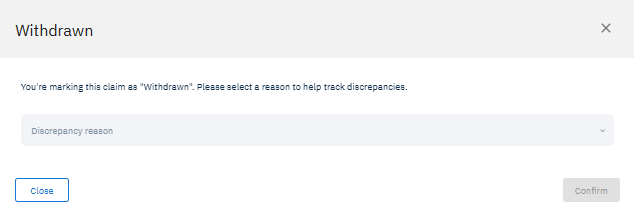
Discrepancy Reasonis already populated → Status changes immediately. No new prompt.If
Discrepancy Reasonis blank → A modal dialog appears:
Step 3: Confirmation
After saving, the claim status is locked to Withdrawn or No Claim. The record becomes read-only except for comments and attachments. A system timestamp and username are recorded for the status change in the Timeline.
Benefits
Audit readiness: Every closed claim has a clear, documented reason
Operational efficiency: No more guessing why a claim was never paid
Reporting accuracy: Distinguish between withdrawn, never-submitted, and zero-value claims
Continuous improvement: Track root causes (e.g., calculation errors) to reduce future mistakes