
Video Walkthrough
Feature Area: Claims Management
Impact: Users merging externally submitted claims into existing Voyager claims
Overview
This release enhances the merge claims feature to prevent invalid merges into finalized or historical claims, improves merge candidate filtering, and adds the ability to include a custom message when merging external claims, which is sent to the counterparty via email.
Last Month’s Functionality (Refresher)
Merging allows users to combine an externally submitted claim into an existing Voyager claim. Only the counterparty amount and received date are carried over. This reduces duplicate handling and keeps claim history manageable.
How it worked:
- On a claim with
externalsource, click the three-dot menu → Merge - System returns to Claim Manager, auto-filtering to payable claims with same counterparty type and vessel name
- System returns to Claim Manager, auto-filtering to payable claims with same counterparty type and vessel name
- Hover over a target claim name to select it
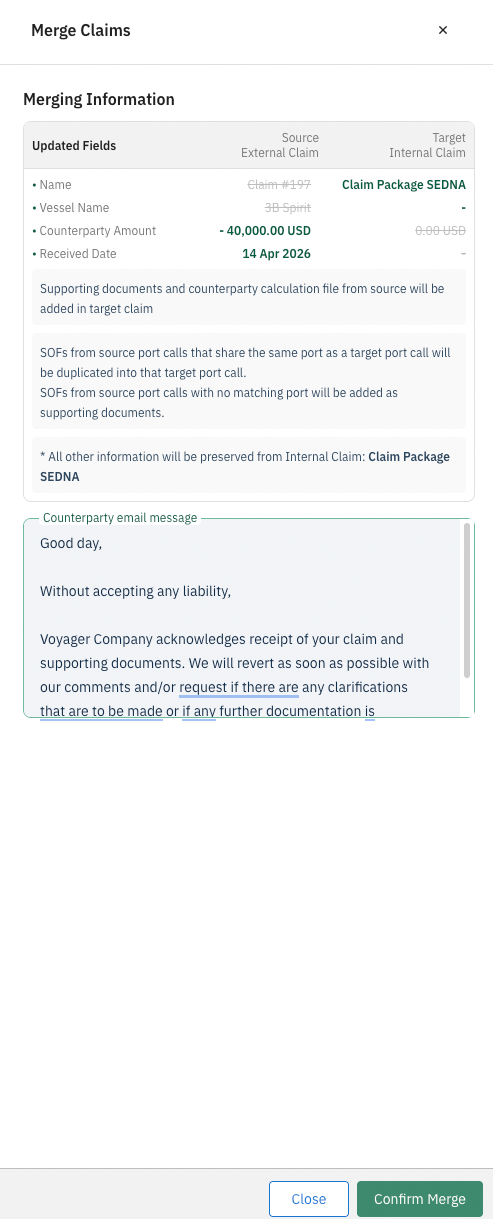
- Confirmation screen shows differences between source and target claim data
- After confirmation, a comment appears in the target claim’s timeline with a link to the original claim
- Original claim is removed from Claim Manager and reports to avoid duplication
New in This Release
Merge Target Eligibility Rules and Filtering Improvements
The system now prevents merging into invalid target claims. A claim cannot be selected or used as a merge target if it is the target of another merge, a historical claim, or in a settled status (Amount Settled Payable / Receivable, Invoice Received, Invoice Sent, Invoice Paid Payable / Receivable). A claim can be set as target if it is in the status Invoice Rejected, No Claim, or Withdrawn.
When entering merge mode, the system now excludes historical and merge-disabled status groups. Disabled status groups and “All Statuses” cannot be re-selected to re-include blocked targets. Non-merge claim browsing and filtering behavior remains unchanged outside of merge mode.
Editable Merge Message & Counterparty Email Notification
External claim submitters may need context when a claim is merged (e.g., claim is invalid, timbarred, or submitted by mistake). Previously, no message could be sent. When merging an external claim, a message box appears in the merge confirmation window. The box is prepopulated with a default message (standard merge notification). User can edit the message before finalizing the merge. After merge is finalized, the message is sent via email to the counterparty’s email address.
Use Cases Supporting Editable Messages
| Scenario | User Action |
|---|---|
| Claim submitted by mistake, not related to any Chevron claims | User finds external submitter’s email (hover over external source), communicates externally, then deletes claim from Voyager |
| Claim is invalid (e.g., timbarred, contractually agreed not to pay) | User changes the default message before merging to explain why claim is not valid. Optionally settles source claim at $0 with discrepancy reason |
This release is designed to enhance user experience and improve the efficiency of claims management, ensuring that all parties involved are well-informed and that the claims process remains seamless.