
Feature: Claim Settings
Available for: Demurrage Claims (currently not available for non-demurrage claims)
What's New?
You can now automatically lock the status field on demurrage claims based on the value of another field. This means you can prevent accidental status changes after a claim reaches a certain state – for example, after an integrated downstream invoicing system has processed the claim. Contact support@voyagerportal.com if you would like to configure a rule.
How It Works
If a demurrage claim has that exact custom field value (case-sensitive, whitespace trimmed, string value) then the status field and status date are disabled – you cannot change them. The status field and date will be grayed out to indicate that it is locked and a tooltip will explain which custom field and value are causing the lock.
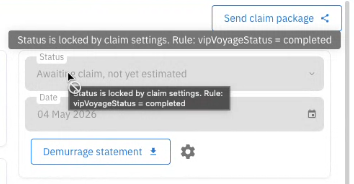
Example: Your downstream invoicing system writes invoiceSystemStatus = "Invoiced" to claims it has processed. Once that value is set, Voyager automatically locks the status – no more manual overrides.
![Example tooltip: "Status is locked because invoiceSystemStatus = Invoiced"]
If a claim is in a settled status, then the claim will remain locked. Change the value of the field within the setting (in the other system if applicable) to unlock the status.
Why This Matters
Before: You had to rely on manual discipline or complex status workflows to prevent changes to finalized claims.
Now: You can automate the lock based on data from external systems – like an invoicing platform, a voyage management system, or any other integration that writes to Voyager custom fields.