
Feature: Port Calls / Laytime
Available for: All parcel voyage and multi-cargo port calls.
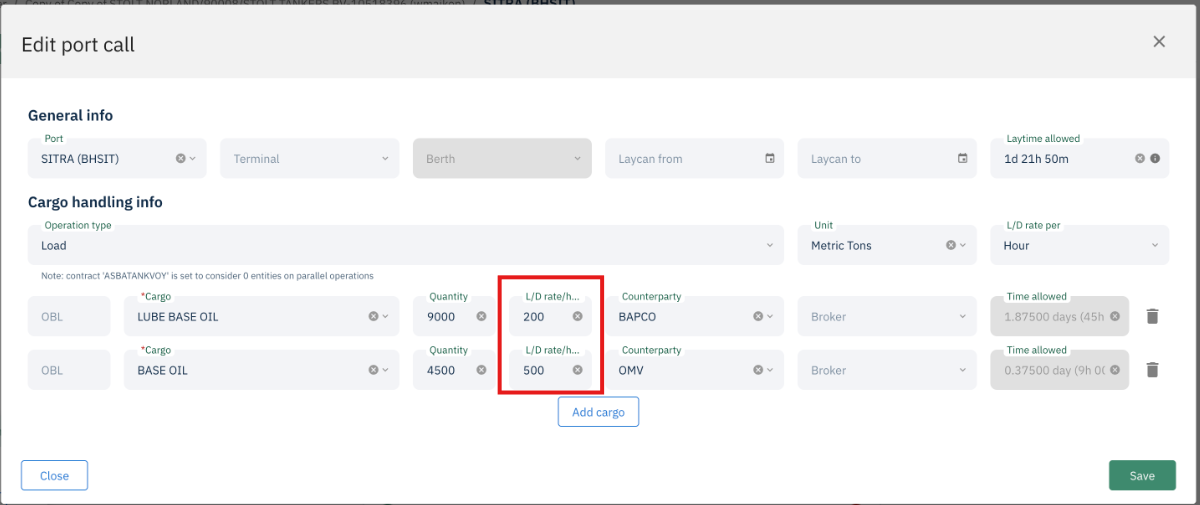
You can now set different operation rates per cargo within the same port call, replacing the previous single rate applied uniformly across all cargoes at a port.
Overview
Previously, one operation rate was set at the port call level and applied to all cargoes within that port call. For voyages with multiple cargoes operating under different contractual rates, this required manual workarounds and could lead to laytime calculation discrepancies. This release allows each cargo in a port call to carry its own rate, improving accuracy and reducing the need for adjustments.
What Changed
The Unit field has moved from the cargo level to the port call level in the UI
Each cargo within a port call now has its own Operation Rate field
Rates feed into the laytime calculation and are visible on hover in the port call summary
Per-cargo rates appear correctly in statement output
How to Use It
Open a demurrage claim and navigate to a Port Call
Click Edit on the port call
For each cargo listed, set the individual Operation Rate
Save the port call
Hover over the port call summary to see the rate breakdown per cargo
Rates will flow through to the laytime calculation and appear in the statement
If the same operation rate applies to all cargoes in a port call, enter the same rate for each.