
Feature Area: Claims Management
Impact: Externally submitted demurrage and non-demurrage claims
Overview
A new comments experience on the claim centralizes communication with external counterparties who submitted their claims directly to Voyager consolidates negotiation history on the claim itself, so your team isn't cross-referencing a separate email thread. No more switching between Voyager and your inbox to track where a negotiation stands — the full comment history, attachments, and timestamps now live on the claim itself. This is Phase 1 of Voyager's broader negotiation communications capability.
How it Works
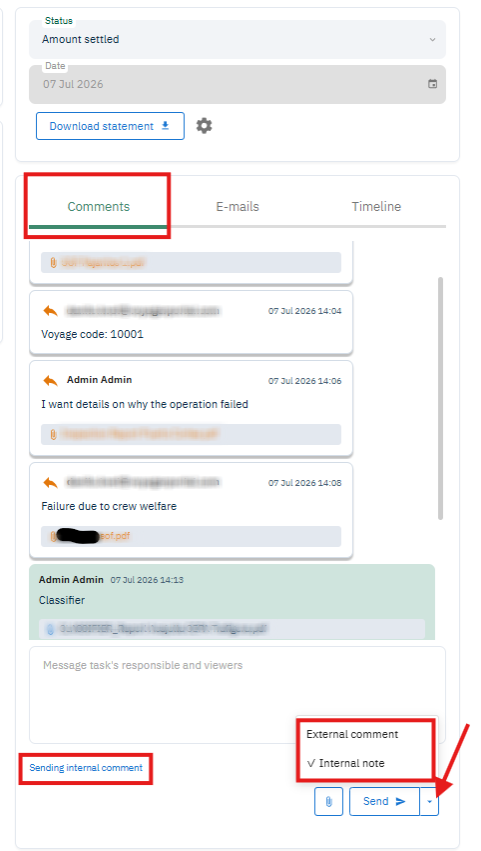
Comments on a claim are visually distinguished as Internal (default green styling) or External (orange, with directional arrow icons). A legend is available above the text box. Comments will show a timestamp and sender email.
Attachments can be linked directly to a comment — they can be deleted and restored without losing the record. They will also be added to the supporting documents on the claim.
Sending an external comment emails the counterparty an one-time-password-protected link where they can reply with comments and documents
Communication is not restricted by claim status — comments are available as soon as the third party submits the claim and remain available on settled claims
Getting Started
Open a claim that was created via external submission form and go to the Comments section
Choose Internal Note or External Comment when posting
Planned Additions
In-App and email alerts for new messages
Automatic progress reminders for stalled-negotiations
Add your demurrage statement without needing to download first
Adding receivers or initiating the communication within Voyager for receivable claims or payable claims original sent to you via email
Continue your conversation after merging your externally submitted claim
Email groups, templates, and signatures
Automatically pulling information from comments and adding them to your claim information