
Feature Area: SOF Processing
Impact: All SOFs. More details below.
Overview
Tagging gangs, holds, cranes, cargoes, and barges from an SOF has always been a manual, time-consuming event. Now it happens automatically as the SOF is parsed — your team reviews and adjusts tags instead of creating and assigning them from scratch.
How it Works
Information stored on the line of an event on an SOF automatically gets tagged — no manual tagging required
Gangs, holds, and cranes are tagged for all customers parsing dry cargo SOFs
Cargo tagging behaves differently depending on where you parse: through a claim, tags are matched only against cargoes already on the port call, reducing false matches for companies with many similar cargo variants. Through the standalone parser, cargoes are tagged against your full master data list, so review tagged cargoes carefully if you have many similar variants
Barge tagging applies only to barges pre-assigned to the claim — unassigned barges appearing in the SOF will not be tagged
All tags remain fully editable — review and adjust any tag before it feeds into the calculation
How to Trigger Tagging
For gangs, holds, and cranes simply parse any SOF with a dry cargo. You can use the claim manager or the stand alone parser
Barge SOFs must be parsed through the Claims Manager for barge tags to apply
Cargo tagging works differently by parsing method: the standalone parser tags any cargo closely matching your master data list; parsing through a claim only tags cargoes already on the port call.
When tagging through a claim, all cargoes you want tagged must be on the port call before parsing — if tagging fails, add the cargoes and reparse.
Step-by-step: tagging cargoes
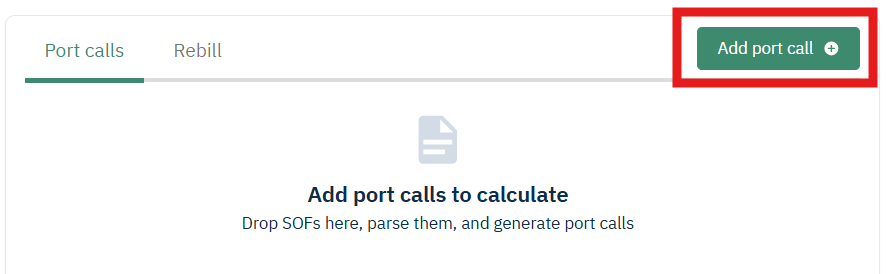
If you do not yet have your port and cargo details, first “Add a port call” instead of drag and dropping an SOF directly into the center of the claim screen.
Next close the add SOF screen and click on “edit” to add cargo name(s) you want included in the tagging.
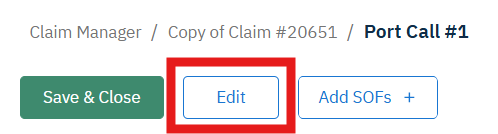
Save and click on “Add SOFs” to begin the parsing.
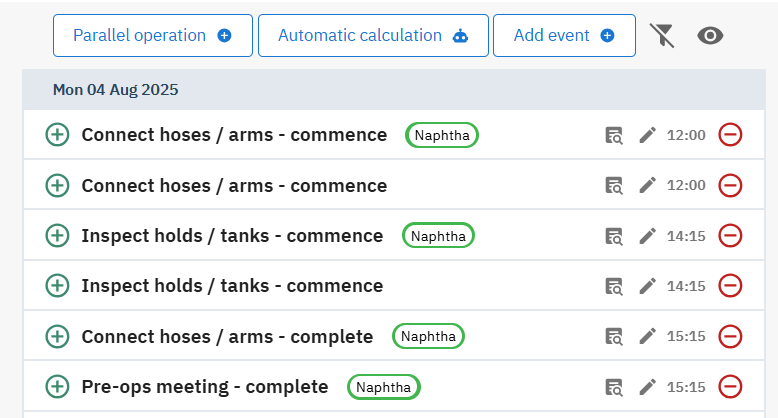
Tags will automatically appear on the parser and laytime calculation page.
Planned Additions
Smarter tagging logic that adapts to how much data is available at parse time
Configurable setting to decide what and when tags are added
Tagging cargoes based on OBL or counterparty instead of just cargo name
Improved user flow to suggest cargoes automatically and add a confirmation step before cargo tags are applied automatically
Handle more complexity for tags that should be added even when the info isn’t directly on the same line as the event. e.g., tag a crane referenced earlier in the document that applies to a later event