
Feature Area: Claims Manager — Non-Demurrage and Demurrage Claim Fields
Impact: All users working with claim data, filtering the Claims Manager list, or building reports
Overview
We are adding more fields, improving data consistency and unlocking new filtering and reporting options. These fields can be used as columns and filters in the Claims Manager list, in reports, and through the public API.
How It Works
Available on both demurrage and non-demurrage claims:
Demurrage claims: Primary Cargo Type and Entity. |
Non-demurrage claims: Primary Cargo Type, Entity, Incoterm, and Charter Type. |
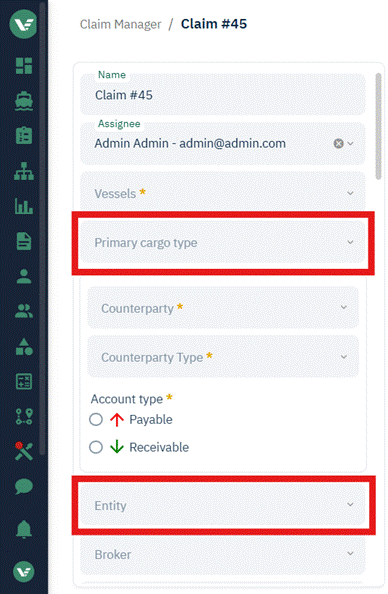
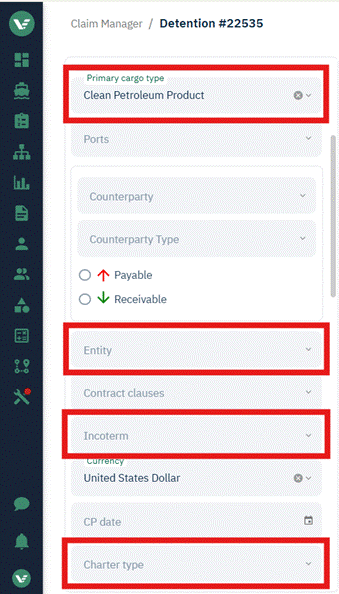
- Primary Cargo Type auto-populates from the first cargo added to the port call, using that cargo's category (e.g. "Agriculture" covers dry and wet agricultural products). You can change it to any other cargo type in use on the claim's port calls. This lets you see a single cargo type per claim at a glance on the claims list or in reporting.
- Entity is a new company-select field alongside the existing Broker field. Use it to document the internal company working on the claim or, if you're a broker, the counterparty you're filing on behalf of.
- Charter Type is a new dropdown field with three selectable standard values: Non-chartered, Spot-Charter, and Time-Charter. This can help you allocate your costs — as contract ingestion expands, knowing charter type is critical to determining who's contractually entitled to file (and liable to pay) a claim.
- Incoterm, based on Incoterms 2020, was also added. Incoterms determine where risk, cost, and — critically — laytime/demurrage responsibility transfer between buyer and seller.
- The full list is: CFR, CIF, CIP, CPT, DAP, DPU, DDP, DES, EXW, FAS, FCA, FOB.
- Note: DAT has been renamed to DPU.
- DES was officially discontinued, but we've kept it available for compatibility with your existing data.
- The full list is: CFR, CIF, CIP, CPT, DAP, DPU, DDP, DES, EXW, FAS, FCA, FOB.
- All fields are available as columns in the Claims Manager list, as Advanced Filter options, through the Public API, and for reporting.
- A Claim Type filter was also added to Advanced Filters as part of this same effort.
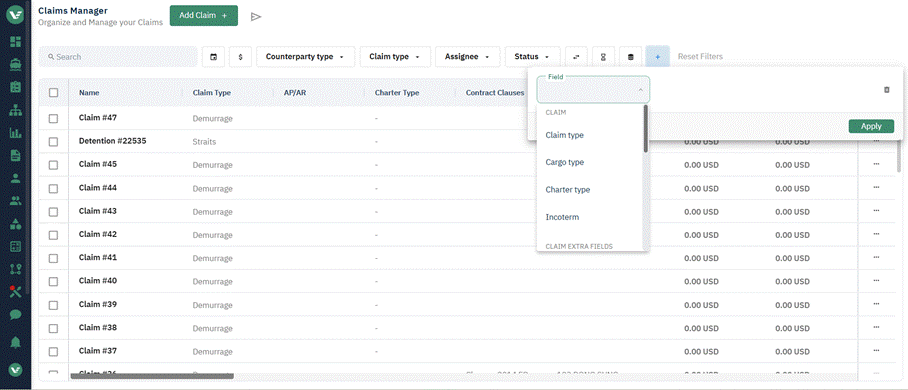
The new fields are available as columns and as Advanced Filter criteria in the Claims Manager list.
Getting Started
- Open a claim (demurrage or non-demurrage) and set the Entity, Charter Type, and Incoterm fields as applicable.
- Add cargo to the port call — Primary Cargo Type auto-fills from the first cargo added; change it if a different cargo is more representative of the claim.
- Add any of these fields as columns or Advanced Filter criteria from the Claims Manager list view, or pull them through the Public API for your own reporting.
Known Limitations
- Cargo category isn't a mandatory field on cargo master data, so Primary Cargo Type may show no category for older or less-common cargo records until that master data is enriched. Contact Support to add cargo types to your cargoes.
- Trader and trade lanes are also commonly requested fields. To provide the flexibility different customers need here, these remain customer-specific configurable fields for now — reach out to Support to configure them.
Planned Additions
In the coming months, we plan to add more default fields to claims, including Voyage Number, a Reference Number on cargo, and claim negotiation milestone dates (e.g. open, sent, settled, voyage start, and voyage end).